Showing posts with label Video. Show all posts

Monday, October 12, 2015

A Deep Dive Into Google Classroom - video tutorial/overview

A Deep Dive into Google Classroom video


For those of you interested in Google Classroom, and would like a video overview, here is a good one for you to try from The Gooru.


Friday, January 30, 2015

Become an ed tech ninja with your friends

Technological change evolves much faster than institutional change can keep pace, so we need a way to learn in a way that fits our busy lives.  Your teacher feedback has shown this to be the case, and you are looking for a way to quickly collaborate and share ideas in an organized way.

This video will show you how to use Bedford's Ed Tech blog the post and comment on your ed tech successes and challenges.


Your posts do not need to be formal.  The idea is that you have a place to quickly share thoughts and ideas when it is convenient for your schedule.  You are extremely busy and getting everyone together for a regular meeting may not be realistic, so a blog like this is ideal in this situation.

Using video, images, audio and links can greatly enhance your ideas.  Most people agree that face-to-face collaboration is the most desirable way to work as a team, but adding something like a short video explanation can get us pretty close.

If you can think of Blogger, Youtube, Facebook, Google, etc. as the modern versions of the slide-rule, abacus, pencil, paper, etc., we can accomplish great things while keeping pace with the way the world works today.  

Our students desperately need us to help them navigate the wide open world of technology.  If we can help our students to avoid getting lost in all of the garbage out there, we can show them how to use technology to love to learn...to become creators of information instead of consumers.

A great place for us to start would be to sign up to follow this blog from the "Follow by email" box in the upper-right corner of this page.  Then I would recommend finding a couple of other blogs that interest you to follow by email.  In this way, you will get frequent updates of other teachers' thoughts and experiences which can provide great motivation and inspiration for your classroom.

Here are a couple to start with:

All Bedford school teachers have been invited to be an author on this blog.  If you can't find it in your email, send a request to support@bedford.k12.ia.us.  If you are not a Bedford school teacher and would like contribute a post to this blog, contact our tech team at support@bedford.k12.ia.us to be added as an author.

Tools used to create this post:
iMovie


update: it appears that we are only allowed 100 authors per blog, so if you didn't receive an invitation and would like to post, let me know and we'll make it work.  :)

Tuesday, October 7, 2014

Including iMovie video in a Google Slides presentation without resorting to Youtube.

My students were working on Google Slides presentations and wanted to insert some video they had recorded.  Upon checking they found Google slides only wanted YouTube video links.   Possible, if they already had a YouTube channel to upload the video to, but not what they wanted to do.

I experimented and found a way to include the video without using YouTube.

Here's my work around to include the video without using YouTube

Thursday, October 10, 2013

Download a Youtube Video

The following article discusses how to flip your classroom when some of your students don't have internet access at home, but more importantly it shows you how to download, or "rip," videos from Youtube and other sites, like Khan Academy, Vimeo, etc.  Once you have downloaded the video, you and your students can view the videos offline.  Additionally, the videos can be edited in iMovie prior to distributing to your students.


NOTE:  In the article, they refer to saving your video file to a "USB."  This "USB" could be a flash drive, jump drive, memory stick, external hard drive, etc.  Referring to a device as a USB can be a little confusing, so you are now ahead of the curve as you read the above article and know that when they say "USB," it could be any memory device that you might be familiar with.

Wednesday, October 2, 2013

Uploading a video to Youtube

1)  Create or find a movie to upload to Youtube.  Click here to verify that it is in a format Youtube accepts.     (Getting video from your camera into your computer so it can be uploaded will be another topic)


2)  Login to your Gmail account.


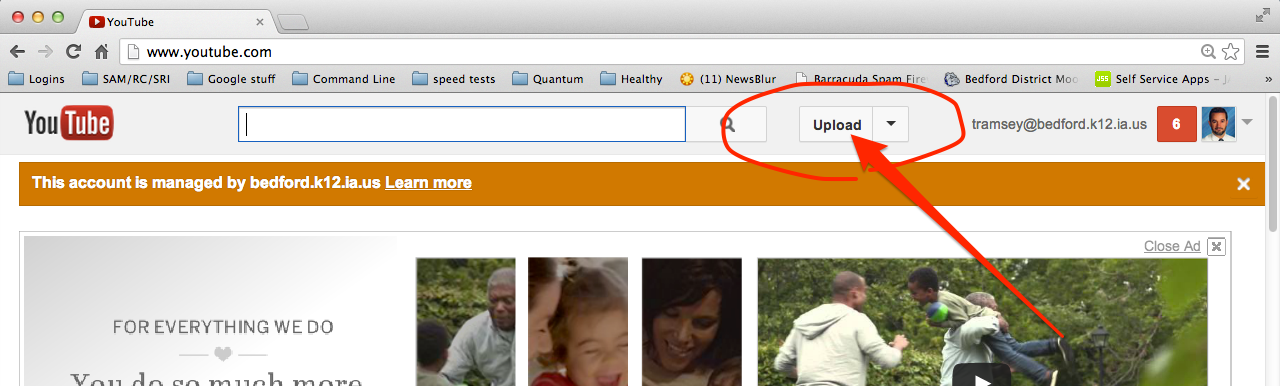
3)  Go to youtube.com and click “Upload”


Embed Your Video on Your School Webpage

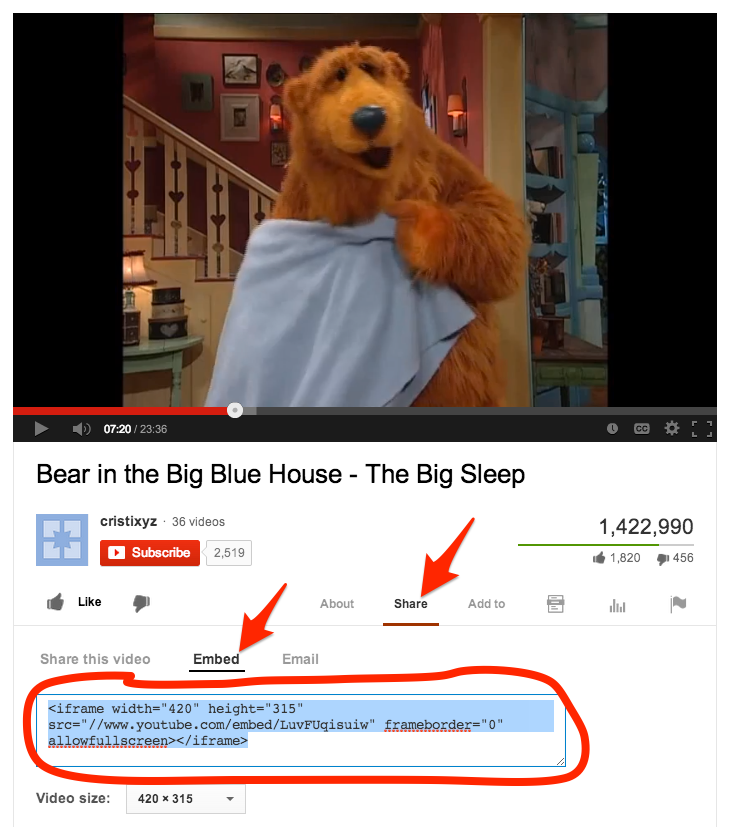
1)  Copy (cmd-C) the embed code from your youtube video.


Embed Your Video in a Moodle Page

1)  Copy (cmd-C) the embed code from your youtube video.