Thursday, November 14, 2013

How to get Reading Blaster on your student's dock

1)  Have your student login.

2)  Drag the question mark that may be on the dock, off the dock into the Desktop space to delete it.


Wednesday, November 6, 2013

Convert Inventory Files to Google Docs Format

The following instructions were created specifically for your inventory files in Numbers format, but could be used for several file types (i.e Pages, Numbers, etc.).


1) Find your inventory files in your inventory folder on your Google Drive.  Select all of your files, and click “Download…” from the “More” menu.


Thursday, October 31, 2013

Google Forms for Beginners

Below is a link to a handy visual guide to Google forms for beginners.


Excerpt from linked site
Google Forms is getting more traction particularly since the introduction of some useful features to its functionality. Now users can very easily insert YouTube videos into forms ; they can also integrate images and create awesome forms with a variety of sophisticated backgrounds. As a teacher, you will find these features handy as you can now create a quiz around a video and get students to exercise their writing, listening, and comprehension skills in ways that were not available before.

Thursday, October 10, 2013

Download a Youtube Video

The following article discusses how to flip your classroom when some of your students don't have internet access at home, but more importantly it shows you how to download, or "rip," videos from Youtube and other sites, like Khan Academy, Vimeo, etc.  Once you have downloaded the video, you and your students can view the videos offline.  Additionally, the videos can be edited in iMovie prior to distributing to your students.


NOTE:  In the article, they refer to saving your video file to a "USB."  This "USB" could be a flash drive, jump drive, memory stick, external hard drive, etc.  Referring to a device as a USB can be a little confusing, so you are now ahead of the curve as you read the above article and know that when they say "USB," it could be any memory device that you might be familiar with.

Thursday, October 3, 2013

How to Update a Shared Calendar

So someone has shared a calendar with you and you need to add an event to it?  Here is a little primer and how to make it happen.


Lets say someone shared a calendar with you.  They called it “Evaluations 2013-2014,” but you don’t see it in your list of calendars.

Wednesday, October 2, 2013

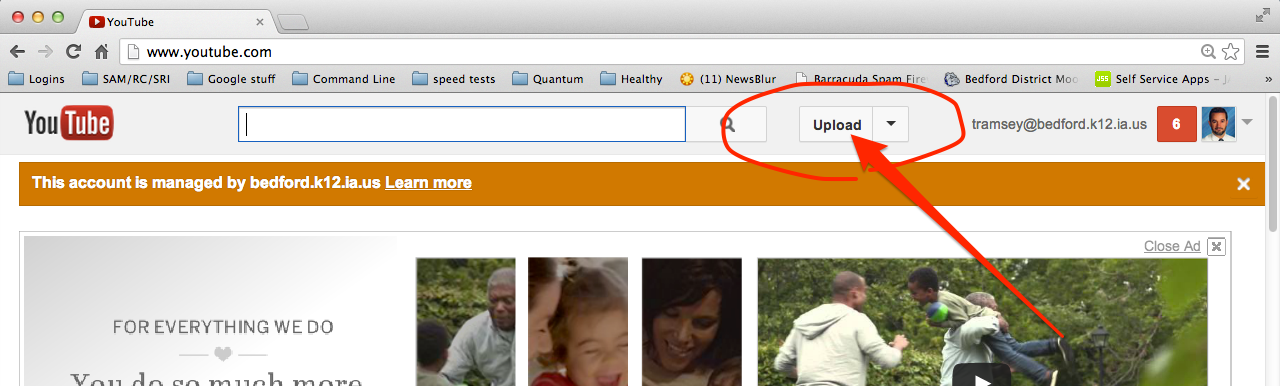
Uploading a video to Youtube

1)  Create or find a movie to upload to Youtube.  Click here to verify that it is in a format Youtube accepts.     (Getting video from your camera into your computer so it can be uploaded will be another topic)


2)  Login to your Gmail account.


3)  Go to youtube.com and click “Upload”


Embed Your Video on Your School Webpage

1)  Copy (cmd-C) the embed code from your youtube video.